An explainer video is the solution to a basic business communication need. Before someone buys from you, they want to know 3 simple things:
- What you offer
- Why it matters
- How it will improve their current situation
Explainer videos relay that information quickly, and in a way that clicks.
One of the biggest reasons customers walk away is that the value of the offering is hard to understand or just doesn’t feel relatable. That is especially true if you sell software or services rather than physical products.
This guide explains what an explainer video is, the formats businesses can use, what makes an explainer effective, and how to plan one around a specific marketing or communication goal.
What Is an Explainer Video?
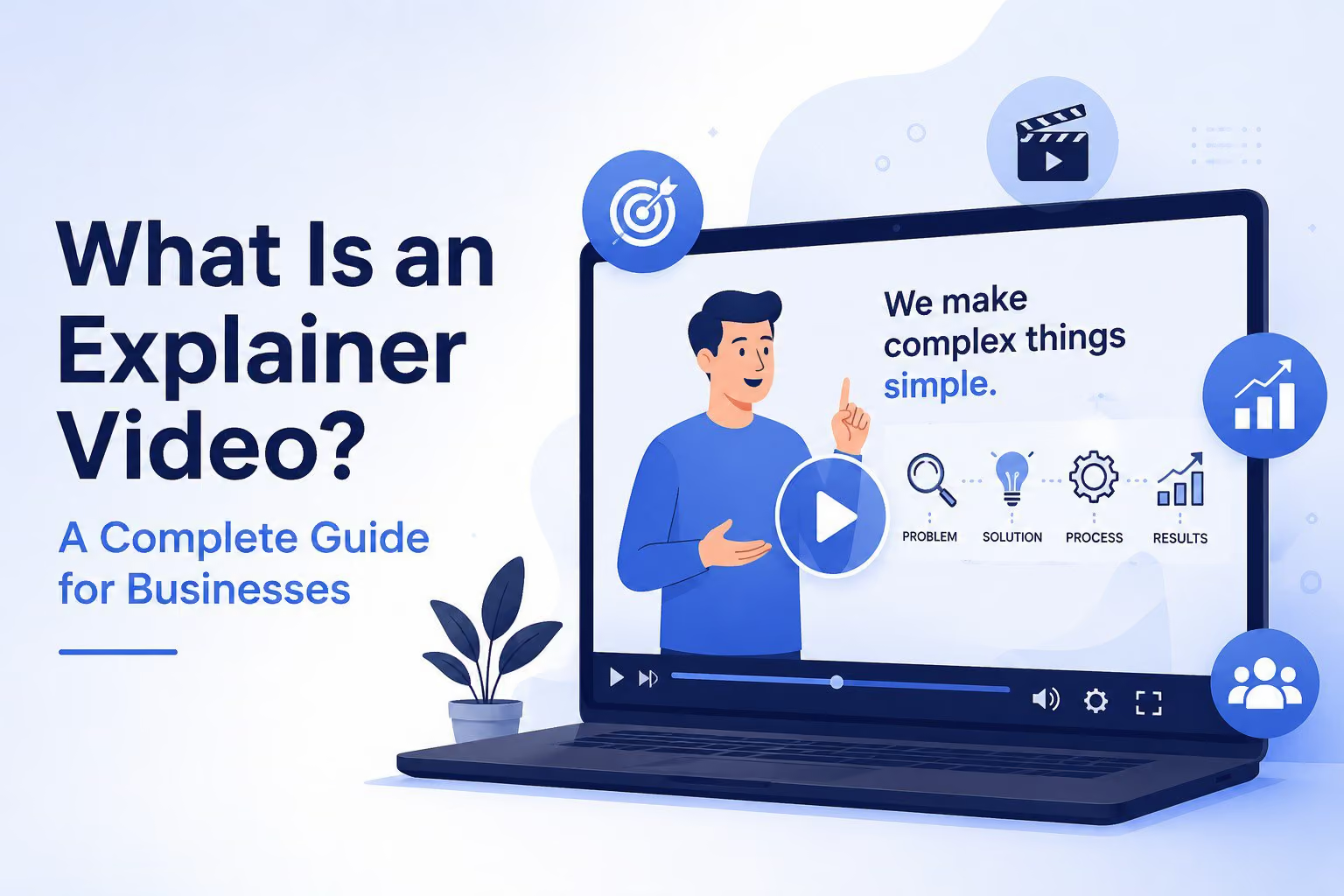
An explainer video is a short video walkthrough that helps the audience understand a product, service, process, or idea. It typically identifies a problem, introduces a solution, explains the value, and directs the viewer toward a clear next step.
Most explainer videos take a simple approach. They break down how to use something to solve problems or create improvements, answering the basic questions a customer or prospect would naturally ask. In a way, a good explainer video works like a salesperson who never gets tired of explaining the product and its benefits.
These videos are extremely flexible assets. You can embed one in an email for one-on-one product education, or place it on a landing page or homepage next to a call to action to convert potential customers. They fit naturally into a wider video marketing strategy at almost any stage of the funnel.
What Makes a Good Explainer Video?
Knowing what an explainer video is matters less than knowing what makes a good one.
The best explainer videos combine storytelling, clarity, and visual appeal. They stay concise, usually 60 to 90 seconds, and deliver one clear value proposition focused on solving a specific problem.
Here are the traits that separate a great explainer video from a forgettable one:
- A strong hook in the first few seconds to grab attention before viewers scroll away
- Simple, clear language that avoids jargon and gets to the point
- Professional visuals and audio that reinforce credibility
- A relatable problem paired with a compelling solution
- A direct call to action that tells viewers exactly what to do next
A good explainer should also feel specific to the business creating it. Generic claims, stock phrases, and feature-heavy scripts make it difficult for viewers to understand why one solution is meaningfully different from another.
Pro tip: Write for the ear, not the eye. If your script sounds clunky when you read it out loud, it will sound worse with a voiceover over it.
The Key Components of an Effective Explainer Video
Before choosing a production style, define the structure of your story.
Most effective explainer videos include five core components.
1. A Clear Problem
Start with a problem, question, or situation the audience immediately recognizes.
The opening should make it clear who the video is for and why the subject matters. Avoid spending the first 15 seconds introducing your company unless brand awareness is the primary goal.
2. A Relevant Solution
Once the problem is established, introduce your product, service, process, or idea as the solution.
Focus on the connection between the audience's challenge and the outcome you can help them achieve. Do not immediately overwhelm viewers with a complete feature list.
3. A Strong Value Proposition
Explain why the solution matters.
What becomes easier, faster, safer, more effective, or more profitable after someone uses it? The value proposition should be specific enough that viewers can recognize the difference between your offer and the alternatives.
4. Engaging Visual Storytelling
Use animation, live action, motion graphics, product footage, typography, sound design, or visual transitions to reinforce the message.
Every creative choice should make the explanation clearer. Visual activity that does not support the story can distract viewers from the information they need to understand.
5. A Direct Call to Action
Decide what the viewer should do after watching.
That action might be:
- Requesting a quote
- Booking a demonstration
- Starting a free trial
- Contacting a sales representative
- Watching a related video
- Downloading a resource
- Visiting a product page
The call to action should reflect the viewer's level of awareness. Someone discovering your company for the first time may not be ready for the same next step as someone actively comparing vendors.
Types of Explainer Videos

There is no single way to produce an explainer video. The right format depends on your subject, audience, brand, timeline, budget, and distribution plan.
Here are the most common types of explainer videos used by businesses.
Animated Explainer Videos
Animated explainer videos use custom illustrations, characters, icons, typography, and motion to communicate a story.
Animation is especially effective when the subject is abstract, technical, difficult to film, or still in development. It gives businesses complete control over what appears on screen and makes it possible to visualize processes, data, systems, and future scenarios.
Common animated explainer formats include:
- 2D animation | Most popular and versatile
- Icon-based animation | Simple, cost-effective
- 3D animation | Great for showing details & innovations
- Isometric animation | Connects complexities & workflows with a big picture view
Our animated explainer video guide provides a more detailed look at animation styles, production costs, timelines, and business use cases.
Live-Action Explainer Videos
Live-action explainer videos use real people, products, environments, or demonstrations.
This style can create a stronger sense of trust and human connection. It works especially well when the people behind the company, the customer experience, or a physical product is central to the story.
Live action may be a good choice for:
- Professional services
- Healthcare organizations
- Consumer products
- Manufacturing
- Company overviews
- Process explanations
- Product demonstrations
- Customer education
The production may include interviews, scripted scenes, product footage, demonstrations, or footage captured at a business location.
Motion Graphics Explainer Videos
Motion graphics use animated text, icons, shapes, diagrams, and data instead of relying primarily on characters.
This style works well for technical processes, financial information, timelines, statistics, workflows, and abstract services. It can give an explainer a clean, modern look while keeping attention focused on the information.
Motion graphics can also be combined with footage, interviews, product images, or interface recordings.
Mixed-Media Explainer Videos
Mixed-media explainers combine multiple visual techniques within one video.
For example, a video might combine:
- Live-action footage with animated overlays
- Product interface recordings with motion graphics
- Photography with kinetic typography
- Interviews with diagrams and data visualization
- 2D animation with 3D product models
Mixed media is useful when no single production style can communicate the full story. It can also help a business create something visually distinctive while maintaining clarity.
Screencast UI Explainer Videos
A screencast shows a digital product, platform, application, or user interface in use.
These videos may use screen recordings, interface recreations, animated callouts, voiceover, and motion graphics to help viewers understand a workflow.
Screencasts work best when seeing the actual interface is necessary for understanding the product. However, showing every click or feature can quickly turn an explainer into a tutorial.
A strong screencast explainer should focus on the workflow and business value rather than attempting to document the entire product.
SaaS explainer videos often combine interface footage with animation and outcome-focused storytelling to help buyers understand complex platforms without sitting through a full product demonstration.
Explainer Video vs. Product Demo vs. Tutorial
Explainer videos, product demos, and tutorials are often grouped together, but they serve different purposes.
Explainer Video
An explainer video introduces the problem, solution, and value at a relatively high level.
- Its primary purpose is to help viewers understand why the product, service, or idea matters. Explainers are commonly used for awareness, consideration, and early-stage sales education.
Product Demo
A product demo shows the product in action.
- It usually focuses on features, workflows, capabilities, and use cases. A demo is most valuable when a prospect already understands the general value and wants to evaluate how the product functions.
Tutorial
A tutorial teaches someone how to complete a specific task.
- Tutorials are usually designed for existing users or customers and offer more detailed, step-by-step instructions than a marketing explainer.
A single company may need all three types of video. The important thing is to avoid trying to make one video serve every purpose.
Why Are Explainer Videos Effective?
The best explainer videos take something complex and make it feel simple in under two minutes. They do not overwhelm viewers with extra information. They make the product easy to grasp for a specific target audience.
That matters because people do their research before they ever talk to a company or click purchase. They are looking for validation that a product or service will make their life easier or fill the need they have identified. Video is the most effective mechanism to deliver that information.
The data backs this up. According to Wyzowl's video marketing research:
- 96% of people have watched an explainer video to learn more about a product or service
- 93% of video marketers say video has helped increase audience understanding of a product or service
- 85% of consumers say a video has convinced them to buy a product or service
- 83% of video marketers say video has directly increased sales
This doesn’t mean every explainer video will automatically generate conversions. Effectiveness still depends on the message, audience, placement, production quality, and call to action.
But the formula is there: Your potential customer base is seeking answers in an easy to understand and impactful way. Explainer videos are the proven effective solution.
How to Make an Explainer Video
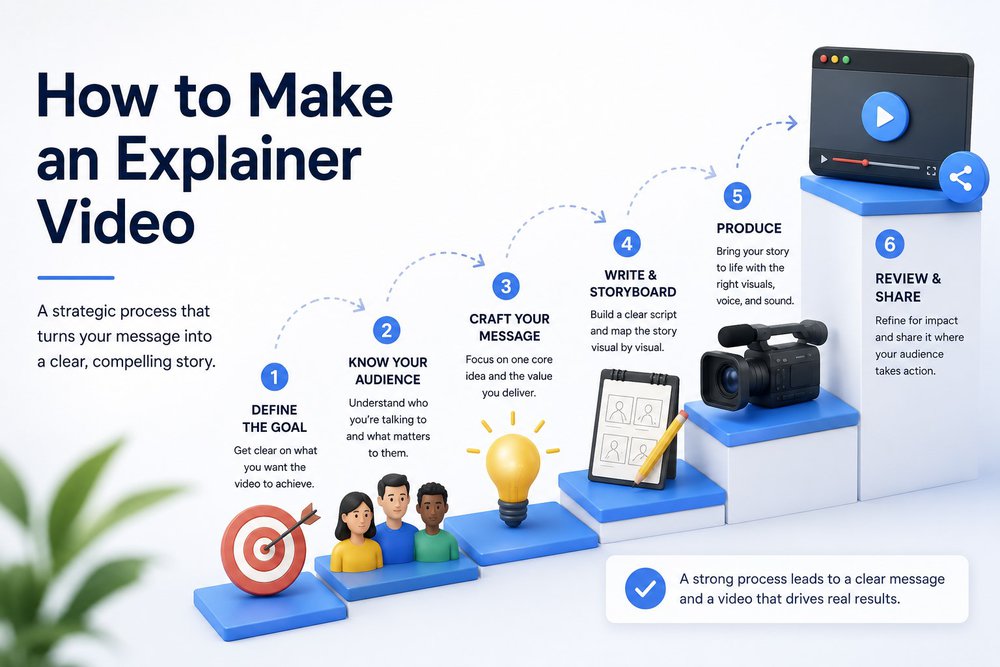
Creating an effective explainer video requires more than selecting an animation style and writing a list of features. Putting the work in on the front end always saves time, headache, and budget on the backend!
Here is a step-by-step overview of the production process.
1. Define the Goal
Start by identifying what the explainer video needs to accomplish.
A goal such as "explain our company" is usually too broad. A stronger goal might be:
- Help homepage visitors understand the service in under 90 seconds
- Increase qualified demo requests
- Introduce a new product to existing customers
- Explain a complex manufacturing process
- Give sales representatives a consistent overview video
- Prepare prospects for a more detailed product demonstration
The clearer the goal, the easier it becomes to make decisions about the script, visuals, length, and call to action.
2. Identify the Audience
Define exactly who needs to understand the message.
Consider:
- What the audience already knows
- What problem they are trying to solve
- What language they use to describe that problem
- What objections or questions they may have
- What information they need before taking the next step
- Who else may influence the decision
A video aimed at a technical evaluator should not use the same language or level of detail as one created for an executive buyer.
3. Choose the Core Message
Determine the single most important idea the viewer should remember.
You may have dozens of features, benefits, differentiators, and use cases. Trying to include all of them usually weakens the story.
Prioritize the information that directly supports the video's goal. Additional information can be communicated through supporting videos, landing page copy, sales materials, or a more detailed product demo.
4. Choose the Format and Style
Select a production approach that supports the message.
Animation may be the best choice for an abstract service or technical process. Live action may be stronger when trust, people, or physical environments matter. Mixed media may be useful when you need both human credibility and visual explanation.
Do not choose a style solely because it is popular. The format should align with the audience, brand, subject, budget, and distribution plan.
5. Write the Script
The script determines most of the video's clarity and pacing.
A strong explainer script should:
- Establish relevance quickly
- Focus on one audience
- Use conversational language
- Avoid unnecessary jargon
- Connect features to meaningful outcomes
- Create a logical flow from problem to solution
- End with a clear next step
A common pacing estimate is approximately 130 to 150 spoken words per minute. That means a 60-second explainer may contain roughly 130 to 150 words.
However, a slower pace may be more appropriate when the subject is technical, emotionally sensitive, or visually complex.
6. Create the Storyboard
The storyboard maps the script to the visuals scene by scene.
It should show how each visual supports the spoken message. This is where the team can identify sections that feel repetitive, confusing, too fast, or visually difficult to communicate.
Resolving these issues before production is much easier than making structural changes after animation or filming begins.
7. Produce the Video
The production process depends on the chosen format.
For animation, this may include:
- Visual development
- Style frames
- Illustration
- Character design
- Motion design
- Animation
- Interface recreation
- 3D modeling and rendering
For live action, production may include:
- Location planning
- Casting
- Crew selection
- Equipment
- Lighting
- Filming
- Directing
- Product or process footage
A mixed-media production may involve both sets of requirements.
8. Add Voiceover, Music, Captions, and Sound Design
Audio has a major impact on how professional and engaging the final video feels.
A well-matched voiceover can establish the right tone and make a complex explanation easier to follow. Music and sound effects can support pacing and emotion without competing with the message.
Captions should also be included, especially when the video will appear on social media, a landing page, or anywhere viewers may watch without sound.
9. Review and Optimize
Gather feedback from the people responsible for the video's goal, message, and accuracy.
Avoid inviting large numbers of reviewers who were not involved in the strategy. Too many competing opinions can result in a longer, less focused video.
During the review process, ask:
- Is the intended audience immediately clear?
- Does the problem feel relevant?
- Is the value proposition easy to understand?
- Is any section repetitive or unnecessary?
- Do the visuals reinforce the script?
- Is the call to action appropriate?
- Can anything be removed without losing meaning?
10. Publish and Distribute the Video
Do not treat publication as the end of the project.
Determine where the video will appear and how people will reach it. Depending on the goal, distribution may include:
- Homepage or service pages
- Landing pages
- Paid advertising
- Sales emails
- Proposals
- Social media
- Trade show displays
- Presentations
- Retargeting campaigns
- Customer onboarding
- Internal communications
If you plan it correctly, a single production can also generate shorter cutdowns, social clips, ad versions, still images, and sales enablement assets. Planning these deliverables before production can help businesses get more value from the original investment.
Pro tip: If video production is not your strong suit, partnering with a professional video production company saves time and gets you a far more polished result.
How Long Should an Explainer Video Be?

For most marketing purposes, 60 to 90 seconds is the sweet spot. It is long enough to set up a problem and present your solution, but short enough to hold attention through to your call to action.
Longer formats of two to three minutes can work for detailed product walkthroughs or complex B2B offerings, where the viewer has opted in to learn more. The key is to match length to context and never pad a video just to fill time.
Under 60 Seconds
Short explainers work well for:
- Paid social campaigns
- Landing page introductions
- Product feature announcements
- Retargeting
- Event displays
- Sales follow-ups
These videos need a narrow message and a highly focused call to action.
60 to 90 Seconds
This range works well for:
- Homepage explainers
- Product or service overviews
- B2B marketing
- Sales enablement
- New product launches
- High-level process explanations
Two to Three Minutes
Longer explainers may be appropriate for:
- Complex B2B products
- Technical systems
- Healthcare or manufacturing processes
- Multiple connected use cases
- Viewers who have actively chosen to learn more
How Much Does an Explainer Video Cost?
Explainer video costs vary based on length, creative concept, production style, script complexity, filming requirements, voiceover, and the number of final deliverables.
A straightforward 2D animated explainer generally costs less than a highly customized 3D production or a live-action video involving actors, locations, and a full crew.
The most useful way to budget is to start with the business goal, audience, and distribution plan. From there, choose a production approach that supports the result you need.
For detailed pricing ranges by production style, read our explainer video cost guide.
You can also use Levitate Media's video pricing calculator to receive a customized price range based on your project.
Where Should Businesses Use Explainer Videos?
An explainer video should appear where audience confusion is most likely to stop someone from moving forward.
Homepage
A homepage explainer can quickly introduce what the company does, who it helps, and why the solution matters. It should support the surrounding page rather than replace all written information.
Landing Pages
Explainer videos can help landing page visitors understand an offer before completing a form, requesting a quote, or booking a demonstration. The video should closely match the promise and CTA on the page.
Product and Service Pages
A product or service page may use an explainer to clarify a complex process, demonstrate value, or show how the offer fits into the customer's workflow.
Sales Outreach
Sales teams can use explainer videos to establish baseline understanding before a call, answer common questions, or re-engage a prospect after a conversation.
Paid Advertising
Short explainer variations can introduce a problem, demonstrate a solution, or communicate a specific differentiator in paid social, YouTube, connected TV, or retargeting campaigns.
Presentations and Events
Explainer videos can support presentations, trade show displays, product launches, investor updates, internal meetings, and conference sessions.
Customer Onboarding
An explainer can introduce a process, platform, or customer journey before users move into more detailed tutorials and training content.
Internal Communication
Businesses can also use explainer videos to communicate policies, systems, initiatives, organizational changes, safety information, and employee benefits.
5 Effective Explainer Video Examples
There are countless ways to make an explainer video. Here are three strong examples to use as a baseline when you build your own.
1. Cloudcover | 2D Animation
CloudCover uses animation to introduce its CC/B1 platform and explain how cyber analytics and automated threat response work together to strengthen real-time security. The video turns a highly technical cybersecurity solution into a clear visual story, helping viewers understand both the platform's capabilities and the business value behind faster, more proactive protection.
2. Egnyte | Motion Graphics
Egnyte gives companies real-time visibility into their data to spot privacy and security issues. Their video leans on animation and illustration to show how different data silos connect and who has access. After the animated portion, they show real product images so viewers understand exactly how to get started.
3. Digital Realty | Mixed Media
Digital Realty's video tackles the challenge of managing huge volumes of company data. The concept of data gravity is not something most people instantly understand, so the video explains what it is and why it matters. By focusing on the problem first, Digital Realty positions its product as the obvious solution.
4. HID Global | Isometric Animation
This isometric animated explainer breaks down identity and access management technology by showing how users, systems, permissions, and security controls connect. The visual structure makes a complex technical process easier to follow while helping viewers understand how the platform supports secure access across an organization.
5. AG Leader | 3D Animation
This mixed-media 3D animated explainer demonstrates how agricultural technology can improve visibility, efficiency, and decision-making across farming operations. By combining realistic 3D visuals with supporting graphics and motion, the video makes complex systems easier to understand while showing how the technology works in a practical setting.
For more inspiration, explore our collections of the best explainer video examples and best animated explainer videos.
Ready to Produce Your Explainer Video?
It does not matter what you sell. A great explainer video is one of the most versatile assets your business can own. It captures attention, simplifies your message, and sets you apart from competitors.
If video production is not your specialty, you do not have to go it alone.
Levitate Media provides end-to-end explainer video production services, including strategy, scripting, storyboarding, live action, 2D and 3D animation, motion graphics, voiceover, sound design, and final delivery.
We can also plan supporting assets such as shorter edits, social clips, paid advertising versions, still images, and alternate formats to help you get more value from the original production.
Contact Levitate Media to discuss your goals, audience, timeline, and budget.
Insights from