There are good videos and bad videos. We all see them.
Most people just hit “skip” on the bad ones, but not me. I hit “repeat” + “full screen” and dig in, analyzing where it went so wrong.
From my perspective as a Marketing Director, most of the time, the bad ones come from one of two things:
- Having a bad (or no) messaging plan at the start
- Not sticking to the messaging plan in production
Bad messaging plans are usually from people trying to stuff TOO MUCH into a short video.
Not sticking to the messaging plan usually results from trying to stuff MORE STUFF into a short video at every edit.
(I’m sure you’re picking up on the theme here ☝️)
But there is a simple recipe for solid, successful video messaging. One that ensures it will hold attention during viewing and be memorable after.
Start with this recipe every time you plan a video, and your message will be heard loud and clear.
Effective video messaging comes down to five things:
building a narrative journey that earns the viewer's attention, organizing your content into clear message blocks, creating immersive visuals instead of abstract concepts, reinforcing key points through callbacks and repetition, and leaving the viewer with an emotional response. Here is how each one works.
1: Focus on the Journey
Everyone loves a cliffhanger. Keep that in mind with your video.
You want to build the journey and earn the viewer's investment in your outcome. Create a little anticipation instead of just starting with the solution.
The easiest way to do this is to highlight the pain points you are addressing. Let the viewer know that you get it. You understand what they are dealing with. And that you are about to save the day.
So, let’s say I am doing the video messaging plan for an explainer video about explainer videos. (Meta, I know) The pain point journey might look something like this:
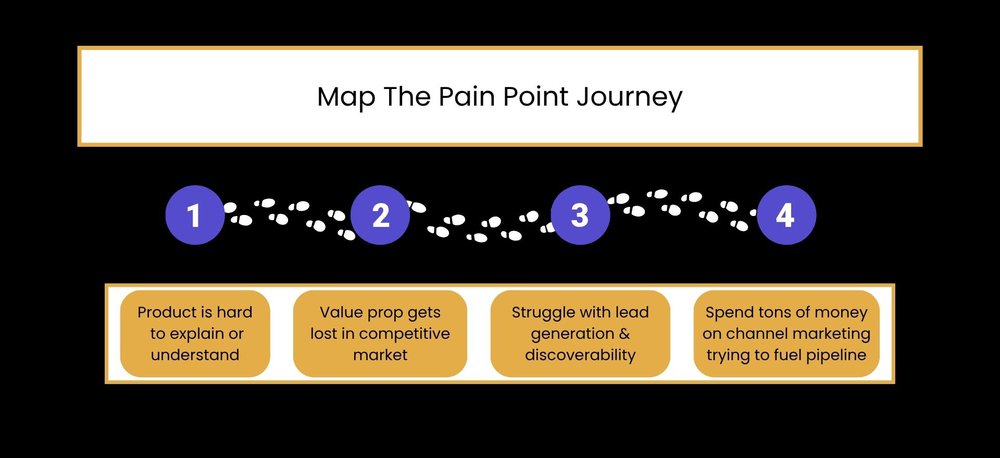
The flow of your video is where the creative comes in, but having these points mapped out helps ensure you’re hitting all the messaging points you want to (and not cramming in the ones you really shouldn’t)
Great example by SynergyPure:
Builds up relatable pain points for beer brewers right from the start. Then, it offers a solution and all the benefits.
2. Message Blocks
Our brains are wired to wander. (Yours might be doing it already).
But we do well with blocks of messaging.
A SIMPLE, SOLID POINT
- a few supportive points
- to back it up.
For a 60-90 second video, I recommend this outline:
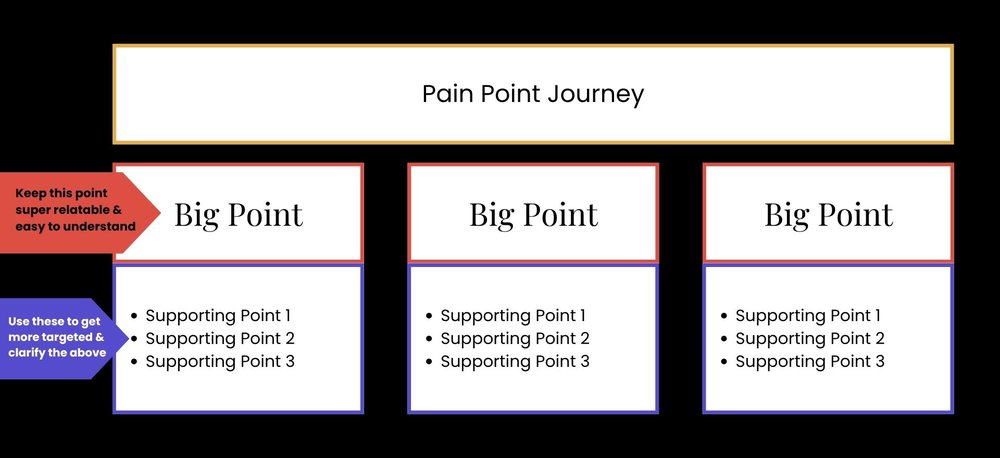
If you need to make more big points, just make sure you keep them all in their own block. Then balance it out - if you’re adding more big points, reduce the number of supporting points. And don’t go crazy; three to five max is ideal.
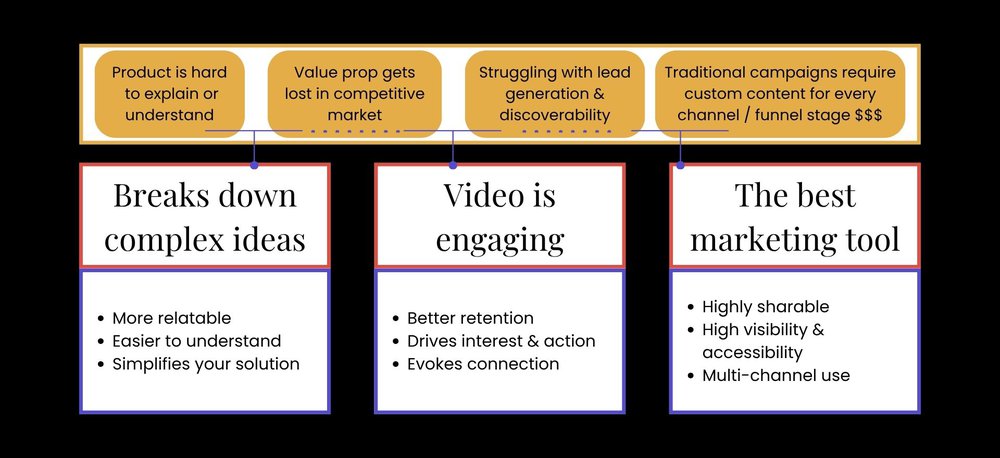
This is where having the pain points mapped really helps. It gives you a structure to work within. Doesn’t fit in the map? Scrap it. It doesn’t work with your plotline.
Continuing my explainer video messaging plan from above, filling in the messaging blocks might look something like this:
- This same structure scales down for short-form video too. For a 15 to 30 second Reel or Short, use one block: one big point with one or two supporting details. The principle is the same - just tighter. The constraint actually makes the framework more useful, because it forces you to pick the single point that matters most.
Like a good conversation, stay on topic. Make the big point, then use a few supporting details to bring it home.
Once your message blocks are mapped out, the next step is turning them into a script. Our guide on how to write a video script picks up right where this framework leaves off.
3: Visualize More Than Conceptualize | Be Immersive
Think of it like reading “fun snow day”
VS.
The power of video is that it activates more parts of our brain than just reading alone.
Immersive = captivating = memorable.
Capitalize on the vividness of our senses. Sight + Sounds + Info Processing, all at once. (Seriously, if we could include smell-o-vision, we would)
This may seem more difficult when we're talking about business videos, but it really isn’t.
- Don’t just say, “Paperwork piles up”; show it.

If your message is a little more abstract, like “data security,” create a simple visual connection like a lock or vault. It sounds a little trivial, but trust me - it works.
A great example from HID:
You feel the long lines, frustration, and anxiety of travel, followed by the stark contrast of effortless visual scanning.
4: Review & Reiterate
You want viewers to engage with your video, but it’s also important that they remember it when the time is right. This is especially important for B2B, big-ticket items, and complex services.
There are two easy memory techniques that work well in video.
Callbacks / Memory Cues
A callback references a recent point in the narrative. It relies on activating memory, which reinforces it. (And it makes us feel smarter because “we get it”). It’s a pillar of storytelling and is easy to do effectively in a video.
Great example by Clevelander South Beach
It’s about the callback to the question: “Do anything cool this weekend?”
Strategic Repetition
Repeating main points at different times (often in a more succinct way) can help make them easier to recall later. So, repeating key messages or summing up your video with a quick rundown can help solidify your value in your viewers' memory.
Great example from AWS
You walk away from this video with “scalability,” “reliability,” and “performance.” Watch it, and you’ll see why. Those differentiators are repeated throughout (both verbatim and with interchangeable terms)
5: Leave Viewers with a Sensation
Sounds ambiguous, but stay with me.
Video is the medium of connection. And connection requires evoking some response.
This could be:
- A sense of discovery (or just feeling a little smarter)
- A sense of wonder (whoa, that was cool)
- Laughter | Relatable humor (highly shareable)
- Heartfelt emotion (creates serious loyalty)
- Inspiration or motivation (encourage action)
- Sense of urgency (FOMO is real)
- Hope | Relief (could be like saving the world, or could be like finding a new organizer that’s going to save you an hour a day - a little hope goes a long way!)
Brand story videos are one of the best formats for this☝️ . When the goal is loyalty or emotional connection, real stories told well will outperform almost anything else. Here are 10 great examples of brand story videos that do exactly that.
The goal is not to manufacture emotion for the sake of it. It is to make sure the viewer feels something that supports the message.
If they should trust you, build confidence. If they should act, create urgency. If the subject is complex, give them clarity. If the story is human, let it feel human.
That is what makes a message stick - and what might be the most undervalued and underused video ingredient.
TL;DR
- Build your story | Create understanding with your audience so they’re all in on the journey
- Block your messaging | Make it relatable, organized, uncomplicated
- Be immersive | Think of your message in more than words & create easy associations
- Repeat the important stuff | Sum up the main points for extra sticking power
- Evoke connection | Spark a feeling with your video
Time To Get Cooking
The best video messaging is focused, intentional, visual, and built around the viewer. Know the journey. Choose only the messages that move it forward. Show what you can. Reinforce what matters. Then leave the viewer with a reason to care.
That is the recipe.
Side Note: I’m a nerd for science and numbers. I can tell you what makes a video work, but if you’re like me, you might have a natural curiosity about the actual science behind it. I LOVED reading this article by Dr. Charan Ranganath, who is a master of all things neuroscience, psychology, and memory. If you want to see some data behind these points, check out his article
Ready to Create Your Next Masterpiece?
A solid video can be the cornerstone of a successful campaign, but there is a bit of art and psychology to crafting truly impactful video messaging. Here’s the great thing: we’re really, really good at it.
When you’re ready to talk video, get in touch. Together, we can produce video messaging that will level up your strategy and ensure your voice is heard.
Or if you want a quick sense of budget first, try the video pricing calculator to get a ballpark in a couple of minutes.
Insights from