Some products are almost impossible to film.
Pre-launch hardware that only exists as a CAD file. SaaS platforms with interfaces that change every sprint. Cybersecurity tools where the entire value proposition is invisible.
In all of these real situations, live action videos hit a wall. Animation solves this by giving you full creative control over how you tell your product story. You decide what the viewer sees, how features are shown, and how complex concepts or ideas become something potential customers actually understand.
This guide covers what animated product videos are, when they outperform live action, which animation style fits your product, and what budgets and timelines to expect.
What Is an Animated Product Video (And How It Differs from an Explainer)
Most marketers use "explainer video," "product demo," and "animated product video" interchangeably. That creates real confusion when briefing an agency.
An animated product video demonstrates product functionality, features, or physical properties through animation. The focus is the product: what it does, how it works, why it matters.
An explainer video leads with a problem-solution narrative. It may never show the actual product in detail.
An animated product demo goes deeper into specific behavior: a UI flow, an internal mechanism, a step-by-step process shown through animation rather than a screen recording.
In B2B these formats overlap on purpose. You might open with the buyer's pain, then move into a product animation video showing exactly how your solution works. That combination is intentional and maps to where the viewer sits in the funnel.
Typical runtimes: 30 to 90 seconds for top-funnel content, 90 to 180 seconds for mid-funnel evaluation.
When Live-Action Product Demos Fall Short
Animation is not always the answer. But there are specific conditions where filming your product creates more problems than it solves.
- Your product does not exist yet: Pre-launch hardware, beta software without a stable UI, or a prototype that cannot be shown on camera. Animation lets you present what the product will do before it physically can.
- The core value is invisible: Cybersecurity threat detection, AI decision logic, data flowing across integrations. No amount of live footage shows how an algorithm works. Animation fills that gap.
- The product operates in inaccessible environments: Industrial equipment inside turbines, molecular processes in clean rooms, devices too large or too small to film effectively. The cost and logistics of filming in these environments is often prohibitive.
- Showing the real UI would expose confidential data: Third-party trademarks, unreleased features, or customer information visible in a live screen recording. Animation gives you a clean, controlled version.
- The product changes frequently: If your software ships updates every quarter, re-shooting live footage each time is not realistic. Animated videos can be updated without a full reshoot.
Products like DOD Technologies' gas detection hardware are a strong example of where animation solves problems that live action simply cannot.
Four Animation Styles for Product Videos and When to Use Each
No single animation style fits every product. The right choice depends on what you are showing, who is watching, and where the video will live.
Motion Graphics and UI Animation

Best for SaaS platforms, dashboards, cloud products, and data-heavy workflows.
This style animates key screens, metric callouts, and integration flows using icons, graphics, and kinetic typography. It works within your existing brand system without requiring custom characters or environments. Cost effective, fast to produce, and easy to update when the UI changes.
Homebot's mobile app video is a strong reference. Product features demonstrated through clean 2D motion graphics that keep the focus on what matters to the viewer.
2D Character and Isometric Animation

Character animation is best when the human experience of using the product is the value proposition.
Think healthcare tools, HR platforms, financial services, and internal communications where your target audience needs to see themselves in the story. Characters show before-and-after emotional states, not just feature lists. That emotional connection is what makes complex products feel approachable.
Session AI is a good example. The product is invisible AI decision-making, but 2D character animation made it feel tangible and human.
Isometric animation is best for bird’s eye views of workflows, complex paths,
or when the value proposition depends on showing how systems, processes, or environments connect.
Think logistics platforms, SaaS workflows, healthcare systems, manufacturing operations, and financial technology where your audience needs to understand how multiple moving parts work together. Isometric animation gives viewers a structured, big-picture view without losing the details. It can show user flows, data movement, team handoffs, facility layouts, and product ecosystems in a way that feels clear instead of overwhelming.
HID Global is a great example. The product is a security system with multiple path points and check ins. As a list, the points would feel overwhelming - but in a visual path, it’s easy to connect the dots.
3D Animation and Product Visualization

Best for physical products, hardware, devices, and anything with internal components that need to be shown.
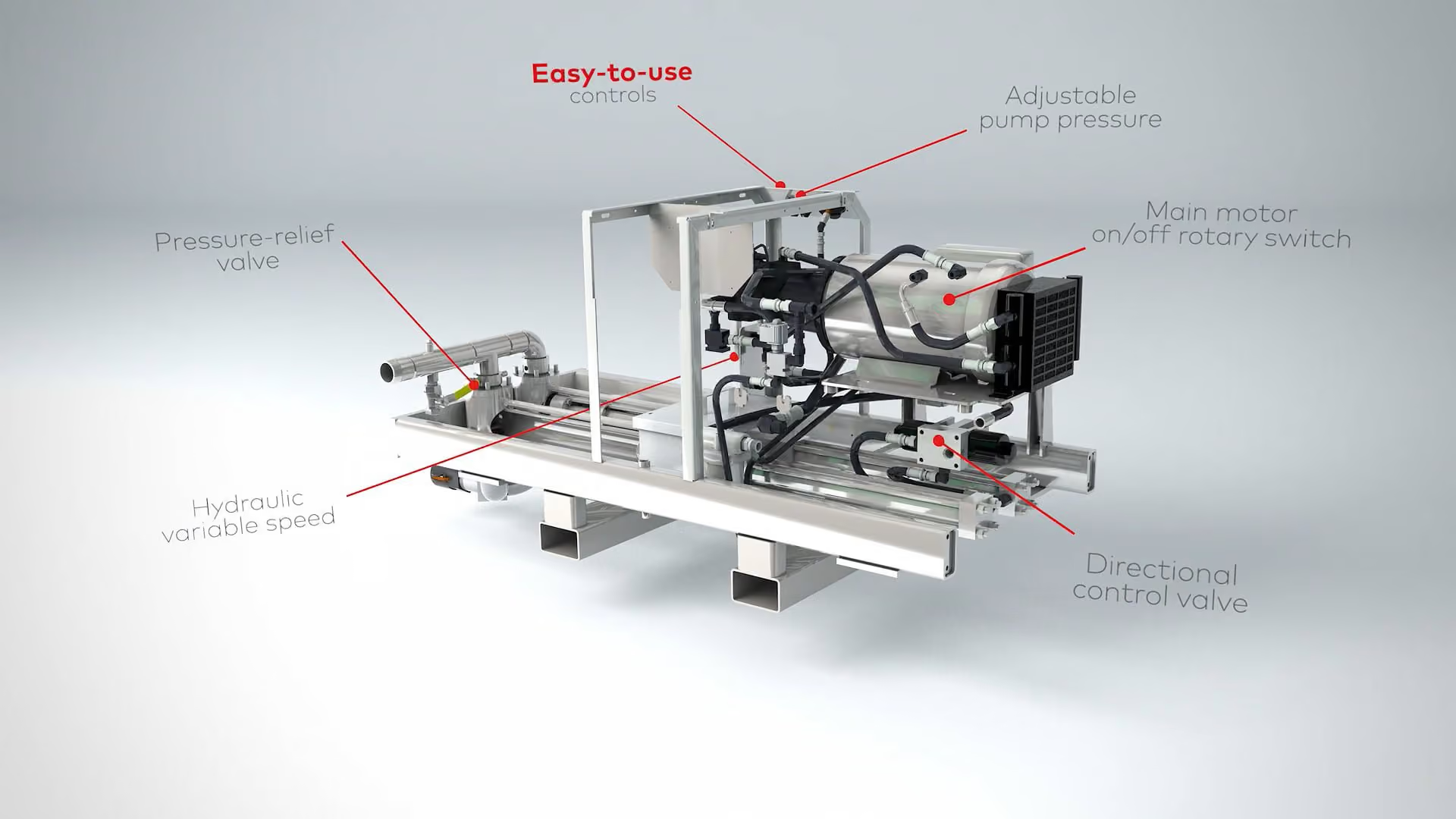
3D animation enables exploded views, cross-sections, mechanism-of-action sequences, and environmental context that live action simply cannot replicate. The result is premium and cinematic, which is why this style works well for trade show displays and product launch campaigns.
Inline Plastics and DOD Technologies both use 3D animation to highlight physical products in ways live footage could not capture.
Mixed Media Animation

Best for products that operate within a spatial or architectural context. Logistics networks, facility management platforms, IoT ecosystems.
Mixed media combines live action footage with animated layers when you want human credibility alongside visual explanation.
NEXTracker's NX Horizon video does this well. Solar tracking technology shown through a hybrid of live action and 3D product animation that grounds the viewer in the real world while explaining the engineering underneath.
Animation vs. Live Action vs. Hybrid: How to Choose
Many B2B brands blend formats, but there are clear situations where one approach is the stronger lead. Here is a simple decision framework.
Choose Live Action When
Your product exists, can be filmed cleanly, and the physical form or real-world usage is the selling point. Live action is hard to beat for credibility when you can put real people and real situations on camera.
Choose Animation When
Your product is pre-launch, abstract, invisible, or changes frequently. Animation gives you full creative control over the story and visuals without coordinating locations, talent, or sets.
If your product is software, a platform, or a service with no physical form, animation is almost always the right default.
Choose Hybrid When
Your product has both a human story and a technical mechanism that needs explanation. Film the founder or customer, then layer in animated sequences that show the inner workings.
NEXTracker is the clearest example of this done well. Real footage grounds the viewer while 3D animation explains what the camera cannot capture.
When Budget and Speed Are the Constraint
Go with 2D motion graphics over 3D. Faster turnaround, lower cost, and still professional enough to perform across every channel.
If the audience is evaluating technical credibility at a trade show or investor presentation, 3D animation justifies the premium. It signals engineering depth and serious investment.
Still weighing the two formats? Read our full breakdown on animated vs. live action video production.
How Animated Product Videos Perform Across the Funnel
Where you place an animated product video matters as much as how you make it. Here is how each funnel stage should shape your approach.
Top of Funnel: Awareness
Short animated clips on LinkedIn and paid social. Motion graphics and 2D perform best at 15 to 30 seconds, designed for silent autoplay. The goal is stopping the scroll and creating enough curiosity to pull potential customers deeper.
Mid Funnel: Consideration
A 90-second animated product explainer on your product page or in a sales deck. This is where animation style and depth matter most. The viewer is evaluating seriously and needs enough detail to picture themselves using the product. A Demand Gen Report study found that 50% of B2B buyers use video specifically to help them make purchase decisions at this stage.
Bottom of Funnel: Decision
A detailed animated product demo embedded in proposals, follow-up emails, and RFP responses. Clarity over creativity at this stage. The viewer already knows what you do. Now they need confidence that it works.
Post-Sale: Onboarding and Adoption
Animated how-to clips and feature walkthroughs inside your product or LMS. Modular 2D animation works best here because it is fast to produce and easy to update as the product evolves.
The Repurposing Advantage
One 90-second animated product video can become a 30-second LinkedIn ad, a 15-second email header clip, and a looping trade show display. All from the same production.
Plan your variant cuts from day one. It saves time, reduces cost, and lets you stand out across every channel without starting from scratch. According to Wyzowl's 2026 State of Video Marketing report, 91% of businesses now use video as a marketing tool and 93% of video marketers report a good ROI from their video investment.
The Production Process for Animated Product Videos

Understanding the process removes the friction from deciding to start. Here is what a typical project looks like from brief to final delivery.
Discovery and Goal Alignment
This is where the entire project gets focused. You define the target viewer, the one thing the video must communicate, and where it will live first. Get this wrong and everything else costs more to fix.
Script and Narrative Structure
A strong animated product video hooks the viewer in the first 3 seconds. A typical script runs:
- Hook: 5 seconds
- Problem: 10 to 15 seconds
- Product demonstration and solution: 30 to 45 seconds
- Proof: 10 seconds
- CTA: 5 to 10 seconds
Script and storyboard each take roughly one week. The script should be written in plain language and map directly to key visuals beat by beat.
Style Frames and Storyboard
This is the most important alignment checkpoint in the whole project. Style frames define the visual language, design elements, and transitions before a single frame is animated. Getting this right saves significant time and budget in the animation phase.
Animation, Voiceover and Sound Design
The production phase. Animation typically takes three to four weeks. Most projects include two to three structured revision rounds. Final files are delivered in multiple formats for different platforms and channels.
Repurposing Plan
Build cutdowns and platform variants before delivery, not as an afterthought. This is how one video becomes five.
Budget and Timeline Expectations for Animated Product Videos
Animation eliminates recurring costs like locations, talent, and set coordination. That makes it more cost effective than live action over time, especially when you factor in future updates.
Here are current ranges for a 60 to 90 second video.
2D Motion Graphics and UI Animation
Budget range: $5,000 to $15,000+ Timeline: 4 to 8 weeks
The most accessible entry point for most B2B teams. Fast to produce, easy to update, and strong enough to perform across every channel.
2D Character Animation
Budget range: $10,000 to $25,000+ Timeline: 6 to 12 weeks
Higher investment reflects the custom character design and scene complexity. Best when the human story is central to the product's value.
3D Product Animation
Budget range: $15,000 to $50,000 and above Timeline: 12 to 16 weeks
The premium option. Justified when visual depth, physical realism, or cinematic quality directly supports the sales story.
Hybrid: Live Action and Animation
Budget and timeline vary based on production day requirements and animation scope. Typically sits closer to the 3D range on both dimensions.
What Affects Your Final Cost
- Factors that increase cost: multiple language versions, high scene complexity, tight turnaround, and custom illustration style development.
- Factors that reduce cost: existing brand assets and UI mockups, clear scope before kickoff, and modular animation structures that reuse elements across the project.
For a rough estimate before your first conversation with an agency, use our pricing calculator.
What to Prepare Before Starting an Animated Product Video
Coming to kickoff prepared saves weeks and budget. Here is what to have ready:
- Target audience and primary placement. Where will potential customers first watch this? Everything flows from that answer.
- Your core message. The one thing a viewer must understand after watching. If you cannot say it in one sentence, it is not ready.
- Product documentation and visual assets. UI screenshots, CAD files, brand guidelines, and any existing visuals. These reduce time and cost significantly.
- Stakeholder alignment. Decide who approves messaging and visuals before production begins. A small consistent review group moves faster than a large rotating one.
- Your launch date. This determines whether standard or expedited timelines apply and directly affects cost.
Levitate Media's team can help shape narrative and structure even without a finished script. Bring the business context. The discovery process handles the rest.
Start With the Right Format
Animated product videos work best when the format matches the product, the placement, and the buyer stage.
Levitate Media helps B2B brands find the right animated video format, style, and budget for their product. Browse the portfolio to see real examples of animated product videos across industries, or use the pricing calculator to scope your budget before your first call.
Insights from